- Home Page /
- Electronics /
- Computer Accessories /
- Networking Products /
- Switches /
- Barco ClickShare Button Switch, Gray (R986150...
0 ratings

Item #:
4650856
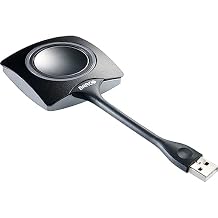
Barco ClickShare Button Switch, Gray (R9861500D01) for Laptop
Item #:
4650856
WST 375
Price Details
Excluding Shipping & Custom charges ( Shipping and custom charges will be calculated on checkout )
*All items will import from US
0 ratings
Write a review
In stock
 Imported from USA store
QTY:
Order now and get it around Friday, August 21
Secured transaction
Ubuy works hard to protect your security and privacy. Our advanced payment security system ensures confidentiality by encrypting your information during transmission using AES (Advanced Encryption Standards) and SSL (Secure Socket Layer) protocols. Your payment details are 100% secure as we do not share your payment details with third party sellers.
Our Top Logistics Partners


Fast
Shipping

Free
Return*

Secure Packaging

100% Original Products

PCI DSS Compliance

ISO 27001 Certified


Note: Step Down Voltage Transformer required for using electronics products of US store (110-120). Recommended power converters Buy Now.


What Stands Out
Instant Connectivity
Experience seamless wireless connection to your laptop, enabling instant screen sharing without the hassle of cables or complex setups, making meetings more efficient and productive.
Compact Design
The sleek and portable design of the ClickShare Button ensures easy transportation and integration into any workspace, allowing users to present effortlessly from various devices.
Cross-Platform Compatibility
Designed to work with a wide range of operating systems, this device supports both Windows and macOS, ensuring an inclusive solution for diverse user environments and maximizing usability.
Product Details
| Operation Mode | OFF-NONE-ON |
| Current Rating | 2 Microamps |
| Operating Voltage | 120 Volts |
| Contact Type | Normally Open |
| Connector Type | Usb Type a |
| Switch Type | Kill Switch |
| Terminal | Solder |
| Circuit Type | 2-way |
| Mounting Type | Plug-In Mount |
| Actuator Type | Button |
| Number of Positions | 4 |
| Lower Temperature Rating | 101 Degrees Fahrenheit |
| Upper Temperature Rating | 100 Degrees Fahrenheit |
| Control Method | Touch |
| Connectivity Protocol | Wi-Fi |
| Wattage | 230 watts |
| Control Type | Manual |
| Compatible Devices | Laptop |
| Color | Gray |
| Item Dimensions | 6.58 x 3 x 1.38 inches (16.7 x 7.6 x 3.5 cm) |
| Unit Count | 1.0 Count |
| Number of Items | 1 |
| Material Type | Unspecified |
| Contact Material | Brass |
| International Protection Rating | IP54 |
| Brand Name | Barco |
| Model | R9861500D01 |
| Global Trade Identification Number | 05400503000005 |
| Manufacturer | Barco |
| UPC | 053926320431 783555029664 750408401885 796594593300 783555095348 642892822317 |
| Part Number | R9861500D01 |
| Item Type Name | Barco Clickshare Button - Button Switch (R9861500D01) |
| Included Components | Button switch |
| Item Weight | 0.28 Pounds (130 grams) |
| Brand | Barco |
| Material | Unspecified |
| Item dimensions L x W x H | 6.58 x 3 x 1.38 inches (16.7 x 7.6 x 3.5 cm) |
Who Should Buy?

-
Frequent Presenters
Ideal for professionals who frequently present and need quick and easy screen sharing in meetings.
-
Remote Workers
Perfect for remote employees who participate in virtual meetings, simplifying their connection to various display devices.
-
Tech-Savvy Teams
Beneficial for teams that value seamless technology integration for collaborative presentations and brainstorming sessions.

-
Casual Users
Not suitable for occasional users who do not need regular access to wireless presentation tools.
Product Description
Barco ClickShare Button Switch, Gray (R9861500D01) for Laptop
Have any Query? Chat with us
Customer Questions & Answers
-
Question:
What is the Barco ClickShare Button?
Answer: The Barco ClickShare Button is a USB wireless presentation system that allows users to share their screens seamlessly during meetings and presentations. By connecting the Button to your device and pressing it, you can instantly share content to a connected display. This ease of use reduces the time spent on technical setups and improves collaboration, making it ideal for business environments, conference rooms, and educational settings. -
Question:
How does the ClickShare Button connect to my device?
Answer: The ClickShare Button connects to your device via USB and is compatible with Windows and Mac operating systems. Once you plug the Button into your USB port, you will initiate the ClickShare app, which facilitates the wireless connection to the ClickShare Base Unit. This straightforward process ensures that anyone can present without needing technical expertise, making it particularly effective in team collaborations and presentations. -
Question:
Can I use the ClickShare Button with multiple devices?
Answer: Yes, the ClickShare Button can be used with multiple devices. You simply need to change the USB connection to the device you wish to present from. Each time you switch devices, you’ll need to ensure that the ClickShare application is running on the new device. This versatility allows different team members to present their content effortlessly in a collaborative workspace without needing a permanent setup for each device. -
Question:
What types of content can I share using the ClickShare Button?
Answer: You can share a wide range of content types using the ClickShare Button, including slideshows, videos, images, and real-time applications. Since it wirelessly transmits your screen content to the display, you can engage your audience with both static and dynamic media. This capability is particularly useful during business presentations, educational lectures, or any scenario where visual content enhances communication. -
Question:
Do I need to install software to use the ClickShare Button?
Answer: Yes, the ClickShare Button requires the ClickShare application to be installed on your device. The software facilitates the wireless presentation process and ensures compatibility with various operating systems. By setting up the app before your presentation, users can experience a smooth and professional sharing experience without technical interruptions, making it especially convenient for last-minute setups. -
Question:
Is the ClickShare Button portable?
Answer: Absolutely! The ClickShare Button is designed to be compact and lightweight, making it highly portable. You can easily carry it in your pocket or laptop bag, ensuring that you’re always prepared for impromptu meetings. This portability is ideal for professionals who move between different workspaces or frequently attend conferences, as it allows for seamless sharing anytime, anywhere. -
Question:
Can I share content from a mobile device with the ClickShare Button?
Answer: The ClickShare Button primarily connects through USB on laptops or desktop computers. However, you can share content from mobile devices by using the ClickShare mobile app, which is available for both iOS and Android. This flexibility enables users to present content from their smartphones or tablets, enhancing engagement during meetings or presentations in any business or educational setting. -
Question:
How do I troubleshoot connection issues with the ClickShare Button?
Answer: If you encounter connection issues with the ClickShare Button, first ensure that the app is running on your device and that the Button is securely plugged in. Restarting the application or re-establishing the connection can often resolve issues. Checking your Wi-Fi connection can also be critical, as the ClickShare system relies on a stable network. Troubleshooting these elements will typically restore your presentation capabilities promptly. -
Question:
What makes the ClickShare Button suitable for corporate environments?
Answer: The ClickShare Button enhances collaboration and productivity in corporate environments by simplifying the screen-sharing process. Its user-friendly design allows team members to present effortlessly without extensive setup or technical knowledge. This feature is particularly beneficial in fast-paced business meetings where time is of the essence, as it encourages participation and streamlines communication among colleagues. -
Question:
Where can I buy the Barco ClickShare Button | USB Wireless Presentation System Button R9861500D01 in Samoa?
Answer: You can purchase the Barco ClickShare Button | USB Wireless Presentation System Button R9861500D01 from Ubuy in Samoa. Ubuy offers a reliable platform for acquiring a variety of tech products and ensures that you receive genuine products with efficient service, making it a convenient choice for your presentation needs.
Barco Switches Editorial Review
No editorial reviews found
Customer Reviews & Ratings
1 customers ratings
-
5 Star
100%
-
4 Star
0%
-
3 Star
0%
-
2 Star
0%
-
1 Star
0%
Review this product
Share your thoughts with other customers
Platform Trust & Buyer Confidence

MA
Mohammad
Verified buyer
“Excellent quality and original too,when ubuy send original things I will appreciate that ,I very satisfied thank you”
23 July 2026 · via Trustpilot
CK
Chitra
Verified buyer
“The order and delivery progress was communicated very well. Package arrived within the estimated time. Products arrived as expected in good condition.”
22-Jul-26 · via Trustpilot
K
kund
Verified buyer
“Good supply of products. Safe payment methods, and shipment worldwide! Genuine products.”
23-Jul-26 · via Trustpilot
OO
Onesi
Verified buyer
“Was my first time buying a product from Ubuy, but I found it so helpful. This is reliable. Gonna place a new order!”
22 July 2026 · via Trustpilot
SJ
SAO JOHN
Verified buyer
“Ubuy is a great online platform to buy stuff. Reliable, fast delivery time and great value for money. I've been using Ubuy online shopping platform for three years now and will continue to do so.”
23 July 2026 · via Trustpilot
Secure Checkout
Global Delivery
Easy Returns
Genuine Products
Product Price History
Important information
- Limitations : For products shipped internationally, please note that any manufacturer warranty may not be valid; manufacturer service options may not be available; product manuals, instructions, and safety warnings may not be in destination country languages; the products (and accompanying materials) may not be designed in accordance with destination country standards, specifications, and labeling requirements; and the products may not conform to destination country voltage and other electrical standards (requiring use of an adapter or converter if appropriate). The recipient is responsible for assuring that the product can be lawfully imported to the destination country. When ordering from Ubuy or its affiliates, the recipient is the importer of record and must comply with all laws and regulations of the destination country.
- Not all the products listed on Ubuy are for sale, as Ubuy is a global search engine. Products are subject to export/trade regulations.
WST 375
Order now and get it around Friday, August 21
This item is not restrict in my country.(Please click on above link if this item is not restrict in your country, So our team will review and allow.)
QTY:
Secured transaction
PCI DSS compliant and ISO 27001:2022 certified, with encrypted payments and full buyer protection on every order.
Our Top Logistics Partners
Fastest cross-border delivery
Ubuy Assurance
Experience worry-free shopping with 100% original products, PCI DSS-compliant payment security, ISO 27001-certified data protection, the fastest cross-border delivery, free returns *, and secure packaging on every order.