- Home Page /
- Electronics /
- Computer Accessories /
- Networking Products /
- Network Adapters /
- Bluetooth Network Adapters /
- TP-Link USB Bluetooth Adapter for PC, Bluetoo...
0 ratings


Item #:
221163448
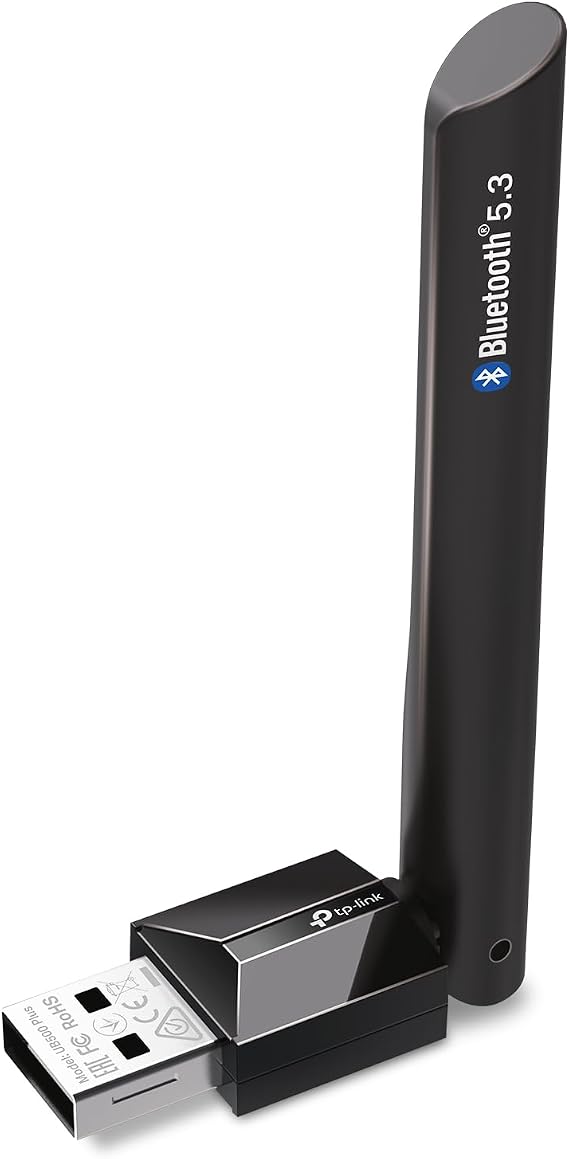
TP-Link USB Bluetooth Adapter for PC, Bluetooth 5.3 USB Long Range Receiver
86% of respondents would recommend this to a friend
Item #:
221163448
WST 48
Price Details
Excluding Shipping & Custom charges ( Shipping and custom charges will be calculated on checkout )
*All items will import from US
0 ratings
Write a review
In stock
 Imported from USA store
QTY:
Order now and get it around Friday, October 02
Secured transaction
Ubuy works hard to protect your security and privacy. Our advanced payment security system ensures confidentiality by encrypting your information during transmission using AES (Advanced Encryption Standards) and SSL (Secure Socket Layer) protocols. Your payment details are 100% secure as we do not share your payment details with third party sellers.
Our Top Logistics Partners


This USB Bluetooth adapter provides faster speed, farther coverage, and is equipped with enhanced data rate and Bluetooth low energy technology for energy-saving wireless connectivity. It can also turn non-Bluetooth PC, desktop, or laptop into Bluetooth-capable, and has a sleek, ultra-small design.

Fast
Shipping

Free
Return*

Secure Packaging

100% Original Products

PCI DSS Compliance

ISO 27001 Certified



Note: Step Down Voltage Transformer required for using electronics products of US store (110-120). Recommended power converters Buy Now.


What Stands Out
Bluetooth 5.4
Experience faster data transfer and improved energy efficiency with Bluetooth 5.4, ensuring seamless connectivity for your devices and enhanced performance for audio streaming and data sharing.
Nano Design
The compact, plug-and-play nano design ensures portability and convenience, allowing you to leave the adapter connected without blocking adjacent ports, making it ideal for laptops and desktops.
Wide Compatibility
Supports various Windows versions including 11/10/8.1/7, ensuring that users can easily connect their keyboard, mouse, and other Bluetooth devices without worrying about compatibility issues.
Product Details
| Brand | TP-Link |
| Number of Packs | 1 |
| Unit Count | 1 Count |
| UPC | 810142823098 |
| Item Highlight | Plug and Play, Adjustable Antenna, Supports Windows 11/10/8.1/7 for Desktop, Laptop, Keyboard, Mouse, etc (UB500 Plus) |
| Number of Items | 1 |
| Manufacturer | TP-Link |
| Built-In Media | Long Range Bluetooth USB Adapter UB500 Plus, Quick Installation Guide |
| Model Number | UB500 Plus |
| Mfr Part Number | UB500 Plus |
| Hardware Interface | Bluetooth |
| Compatible Devices | Laptop |
| Data Link Protocol | Bluetooth, USB |
| Compatible Operating System Family | Windows |
| Minimum Required Operating System Version | Windows 7 |
| Item Dimensions L x W x H | 3.19"L x 1.65"W x 0.66"H (8.1 x 4.2 x 1.7 cm) |
| Item Weight | 9.07 g |
| Color | Black |
| Product Dimensions (L x W x H) | 3.19"L x 1.65"W x 0.66"H (8.1 x 4.2 x 1.7 cm) |
Who Should Buy?

-
Casual Users
Ideal for users who need basic Bluetooth connectivity for devices like keyboards and mice.
-
Laptop Owners
Perfect for those seeking a small, portable Bluetooth solution to connect devices on the go.
-
Windows Users
Supports multiple Windows versions, making it suitable for a wide range of desktop and laptop users.

-
Gaming Enthusiasts
May not offer the low latency required for high-performance gaming accessories.
Product Description
TP-Link USB Bluetooth Adapter for PC, Bluetooth 5.3 USB Long Range Receiver
Have any Query? Chat with us
Customer Questions & Answers
-
Question:
What devices are compatible with the TP-Link USB Bluetooth Adapter?
Answer: The TP-Link USB Bluetooth Adapter is compatible with a wide range of devices including PCs, laptops, and more. It supports Bluetooth 5.0 and is backward compatible with older versions like 4.2, 4.1, and 4.0. This allows seamless connectivity with various peripherals such as headphones, keyboards, mice, and printers. Its Plug and Play feature makes it user-friendly, requiring no additional drivers on most operating systems, particularly Windows 11, 10, and 8. By easily connecting your devices, you can enhance your computing experience without the need for cluttered cables. -
Question:
How do I install the TP-Link USB Bluetooth Adapter on my PC?
Answer: Installing the TP-Link USB Bluetooth Adapter on your PC is straightforward. Simply plug the nano-sized dongle into a USB port on your computer. Most modern operating systems will automatically recognize the adapter and install the necessary drivers. For Windows users, no manual driver installation is needed for versions 8 and above. Once connected, you can access Bluetooth settings to pair it with your devices, making it ideal for streaming audio or connecting peripherals wirelessly without fuss. -
Question:
Can I use the TP-Link Bluetooth Adapter for gaming?
Answer: Yes, the TP-Link USB Bluetooth Adapter can be used for gaming. It supports Bluetooth 5.0, which provides low-latency connections that are ideal for gaming peripherals such as controllers and headsets. This ensures a smooth audio experience and synergy with wireless gaming devices, allowing you to play without the hassles of wires. Keep in mind that connection quality may vary depending on distance and interference in your environment. -
Question:
What is the range of the TP-Link USB Bluetooth Adapter?
Answer: The TP-Link USB Bluetooth Adapter typically offers an effective range of up to 20 meters (approximately 65 feet) in open spaces. However, this range can be reduced in cluttered or obstructed environments, such as homes with thick walls or multiple electronic devices. The Bluetooth 5.0 standard ensures that as long as you remain within this range, you can maintain a stable and reliable connection to your Bluetooth devices, allowing for effective use whether at your desk or across the room. -
Question:
Does the TP-Link USB Bluetooth Adapter support file transfer?
Answer: Yes, the TP-Link USB Bluetooth Adapter supports file transfer capabilities via Bluetooth. You can easily send and receive files between paired devices, which is essential for transferring music, documents, and images quickly and conveniently. For example, if you want to transfer photos from your smartphone to your PC, this adapter facilitates that wireless communication seamlessly, enhancing your productivity and convenience. -
Question:
Is there a limit to the number of devices I can connect to the TP-Link Bluetooth Adapter?
Answer: While the TP-Link USB Bluetooth Adapter can connect to multiple devices, the effective number depends on the Bluetooth version and device specifications. Generally, Bluetooth technology allows connecting up to seven devices simultaneously, but practical performance may vary based on transmission type and bandwidth requirements. For instance, you might connect a keyboard, mouse, and headset at once, optimizing your workspace with fewer cables. -
Question:
How does the TP-Link USB Bluetooth Adapter improve audio quality for headphones?
Answer: The TP-Link USB Bluetooth Adapter significantly enhances audio quality when using wireless headphones thanks to its support for Bluetooth 5.0, which includes advanced features like Enhanced Data Rate (EDR) and Bluetooth Low Energy (BLE). These improvements result in clearer audio and reduced latency. Enjoying music, podcasts, or gaming with quality sound becomes more accessible and enjoyable, fulfilling the needs of audiophiles and gamers alike. -
Question:
Can I use the TP-Link Bluetooth Adapter with Linux or Mac OS?
Answer: While the TP-Link USB Bluetooth Adapter is primarily designed for Windows operating systems, it can often be used with Linux and Mac OS as well. However, users may need to install additional drivers or software to enable full functionality. This flexibility means you can still enjoy wireless connectivity with devices across different platforms, making it a versatile option for various users seeking Bluetooth connectivity irrespective of their operating system. -
Question:
Is the TP-Link USB Bluetooth Adapter compact and portable?
Answer: Absolutely! The TP-Link USB Bluetooth Adapter features a nano design, making it extremely compact and portable. Its small size means it can remain connected to your laptop or PC without obstructing adjacent ports, and you can easily store it in a pocket or bag. This is perfect for users on the go, such as students or professionals who travel frequently and need reliable wireless connectivity wherever they work. -
Question:
Where can I buy the TP-Link USB Bluetooth Adapter for PC?
Answer: You can purchase the TP-Link USB Bluetooth Adapter for PC conveniently on Ubuy. They provide a reliable platform to find this product, ensuring a secure purchasing experience. Ubuy also offers various options to suit your preferences, allowing you to explore additional products that complement the Bluetooth adapter, enhancing your overall digital ecosystem.
TP-Link Bluetooth Network Adapters UB500 Plus Editorial Review
TP-Link USB Bluetooth Adapter for PC - Bluetooth 5.4 USB Dongle Receiver offers a seamless and reliable Bluetooth connection for your PC peripherals. Many users appreciate the plug-and-play feature, which makes setup effortless, particularly for Linux users with kernel versions 6.16+. Reviewers commend its stability and ease of use, even for gaming with controllers, noting zero lag during operation. However, some minor concerns revolve around its limited audio codec support, which might not satisfy audiophiles. Ultimately, this adapter is a solid choice for enhancing Bluetooth connectivity without complications.
Customer Reviews & Ratings
1 customers ratings
-
5 Star
0%
-
4 Star
100%
-
3 Star
0%
-
2 Star
0%
-
1 Star
0%
Review this product
Share your thoughts with other customers
Pros
- Easy plug-and-play setup for quick installation
- Stable Bluetooth connection without interference
- Compatibility with various devices, including controllers
- Compact design that doesn't obstruct neighboring ports
- Great performance in streaming and gaming scenarios
Cons
- Limited audio codec support may not please audiophiles
Platform Trust & Buyer Confidence

JK
Jasmin
Verified buyer
“Great products and very good service: very easy and very fast international delivery.”
9 September 2026 · via Trustpilot
AG
Anke
Verified buyer
“Wonderful online shopping experience, smooth transaction from the start. Payment method works conveniently and delivery is unexpectedly fast and reliable. You go the extra mile for service. What makes this even more amazing, you deliver to Namibia. I will remain a happy Ubuy customer and will increase my purchases for sure! Thank you!”
10 September 2026 · via Trustpilot
H
Hazel
Verified buyer
“Very easy to find the products what you need, and so fast delivery, that’s why I highly recommended to others costumers to used ubuy.”
10 September 2026 · via Trustpilot
O
Opaleye
Verified buyer
“I received exactly what I ordered I was skeptical about your site because that was my first time to order. But the order came timely and neatly packaged. I was not disappointed. Thank you.”
11 September 2026 · via Trustpilot
AC
Adele
Verified buyer
“Easy to find and order what you want on the website. Delivery is quick to the UK”
8 September 2026 · via Trustpilot
Secure Checkout
Global Delivery
Easy Returns
Genuine Products
Product Price History
Important information
- Limitations : For products shipped internationally, please note that any manufacturer warranty may not be valid; manufacturer service options may not be available; product manuals, instructions, and safety warnings may not be in destination country languages; the products (and accompanying materials) may not be designed in accordance with destination country standards, specifications, and labeling requirements; and the products may not conform to destination country voltage and other electrical standards (requiring use of an adapter or converter if appropriate). The recipient is responsible for assuring that the product can be lawfully imported to the destination country. When ordering from Ubuy or its affiliates, the recipient is the importer of record and must comply with all laws and regulations of the destination country.
- Not all the products listed on Ubuy are for sale, as Ubuy is a global search engine. Products are subject to export/trade regulations.
WST 48
Order now and get it around Friday, October 02
This item is not restrict in my country.(Please click on above link if this item is not restrict in your country, So our team will review and allow.)
QTY:
Secured transaction
PCI DSS compliant and ISO 27001:2022 certified, with encrypted payments and full buyer protection on every order.
Our Top Logistics Partners
Fastest cross-border delivery
Features & Benefits
- Applies Bluetooth 5.0 technology
- Faster speed and farther coverage
- Nano-sized design
- Plug and play
- Reliable for wireless communication
- Not compatible with Mac, Linux, TV, or Windows 8
Ubuy Assurance
Experience worry-free shopping with 100% original products, PCI DSS-compliant payment security, ISO 27001-certified data protection, the fastest cross-border delivery, free returns *, and secure packaging on every order.