- Home Page /
- Electronics /
- Computer Accessories /
- Computer Accessories & Peripherals /
- Audio & Video Accessories /
- Webcams & VoIP Equipment /
- Webcams /
- Logitech Brio 501 Full HD Webcam with Auto Li...
0 ratings




Item #:
222523248
Logitech Brio 501 Full HD Webcam with Auto Light Correction, Show Mode, Noise Reduction Mics, Privacy Cover, Works with Microsoft Teams, Google Meet,
Item #:
222523248
WST 491
Price Details
Excluding Shipping & Custom charges ( Shipping and custom charges will be calculated on checkout )
*All items will import from US
In stock
 Imported from USA store
QTY:
Order now and get it around Sunday, July 05
Secured transaction
Ubuy works hard to protect your security and privacy. Our advanced payment security system ensures confidentiality by encrypting your information during transmission using AES (Advanced Encryption Standards) and SSL (Secure Socket Layer) protocols. Your payment details are 100% secure as we do not share your payment details with third party sellers.
Our Top Logistics Partners


Show up to every video call feeling confident, seen, and heard with Logitech Brio 500.

Fast
Shipping

Free
Return*

Secure Packaging

100% Original Products

PCI DSS Compliance

ISO 27001 Certified


Note: Step Down Voltage Transformer required for using electronics products of US store (110-120). Recommended power converters Buy Now.


What Stands Out
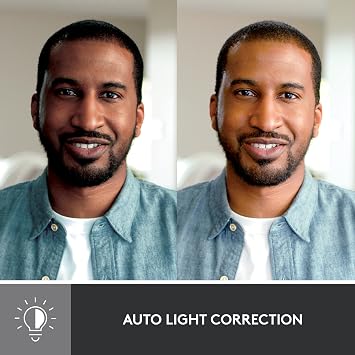
Auto Light Correction
Adjusts automatically to different lighting conditions, ensuring you always look your best on camera, even in low light, enhancing your professional appearance during video calls.
Show Mode
Allows for seamless transitions and presentations by focusing on the speaker, making it ideal for live demonstrations and interactive meetings, enhancing engagement in virtual environments.
Noise Reduction Mics
Equipped with advanced microphones that filter out background noise, providing crystal-clear audio quality for uninterrupted conversations and presentations, essential for professional communication.
Product Details
- Compatible with Nintendo Switch 2’s new GameChat mode
- Advanced Image Quality: Full HD 1080p webcam resolution provides outstanding image quality so everyone can see you clearly during meetings
- Auto Light Correction (RightLight 4): RightLight 4 video lighting technology automatically adjusts to the lighting in your environment, so you can be seen clearly even in low light
- Auto-Framing (RightSight): Auto-framing (1)(3) centers the video camera on you, allowing you to stand and move during meetings without leaving the frame
- Show Mode: Present your work or other objects on your desk with Show Mode, which lets you tilt the web camera up or down with one hand
- Dual Noise Reduction Microphones: Be heard clearly in noisy environments thanks to noise canceling mics that filter out background sound during calls
- Webcam with Privacy Cover: To protect your privacy between meetings, simply rotate the integrated webcam privacy shutter to completely block the camera
- 90-Degree Field of View: A wider-than-normal FOV gives you extra space to move around or have a second person on the camera with you; use Logi Tune to zoom in or out to a full 90º width
- Logi Tune: Pair with Logi Tune to customize your Logitech Webcam experience; zoom in or out, mute the microphone, adjust color and image resolution, manage auto-frame, and set automatic updates
| Sensor Type | CMOS |
| Connectivity Technology | USB-C |
| Color | Black |
| Features | Low Light |
| Water Resistance Level | Not Water Resistant |
| Has Image Stabilization | No |
| Image stabilization | False |
| Form Factor | Compact |
| Item Weight | 121 Grams |
| Style Name | Webcam |
| Item Dimensions D x W x H | 1.24"D x 4.33"W x 1.24"H (3.1 x 11 x 3.1 cm) |
| Operating System | Proprietary |
| Maximum Focal Length | 3.8 Millimeters |
| Maximum Aperture | 2 f |
| Minimum Focal Length | 1.0 |
| Lens Type | Zoom |
| Minimum Aperture | 2 f |
| Focus Type | Auto Focus |
| Screen Size | 3 |
| Display Resolution Maximum | FHD |
| Flash Memory Type | SD |
| Flash Memory Speed Class | C4 |
| Flash Memory UHS Speed Class | C4 |
| Flash Memory Video Speed Class | V60 |
| Zoom | Digital |
| Brand | Logitech |
| Model Number | 960-001514 |
| Camcorder Type | Webcam |
| Model Name | 960-001514 |
| Built-In Media | Webcam |
| Antenna Location | Camera,Webcam |
| Are Batteries Included | No |
| Manufacturer | Logitech |
| UPC | 097855181510 |
| Unit Count | 1.0 Count |
| Video Resolution | 1080p |
| Video Capture Format | MPEG |
| Effective Still Resolution | 2.07 MP |
| Shooting Modes | Automatic, Shutter Priority |
| Image Aspect Ratio | 16:9 |
| Supported Image Format | JPEG |
| White Balance Settings | Auto |
| File Format | JPEG |
| Exposure Control Type | Automatic |
| Effective Video Resolution | 1080 Pixels |
| Supported Audio Format | AAC, MP3 |
| Compatible Devices | Office |
| Photo Sensor Technology | CMOS |
| Video Capture Resolution | 1080p |
What's in the box
Webcam
Who Should Buy?

-
Remote Workers
Ideal for professionals working from home who need high-quality video calls for meetings and presentations.
-
Gamers
Perfect for gamers who want to enhance their streaming quality on platforms like Twitch and YouTube.
-
Content Creators
Great for vloggers and YouTubers looking for a webcam that offers high-definition video and audio quality.

-
Casual Users
Not suitable for occasional users who don’t require professional-grade video quality for casual video calls.
-
Budget-Conscious Buyers
May not fit users looking for an affordable webcam without advanced features and high-definition capabilities.
-
Low-Usage Scenarios
Not beneficial for individuals who use webcams infrequently and could settle for basic integrated options.
Product Description
Have any Query? Chat with us
Customer Questions & Answers
-
Question:
What features does the Logitech Brio 500 Full HD Webcam offer?
Answer: The Logitech Brio 500 Webcam boasts Full HD 1080p resolution, Auto Light Correction, and Show Mode, enhancing your video quality regardless of lighting conditions. Additionally, it features built-in dual noise reduction microphones for clear audio capture and a privacy cover that ensures your security. This webcam is particularly beneficial for remote work, online meetings, and streaming, as it optimizes your appearance in various settings, ideal for professional environments or personal use. -
Question:
How does the Auto Light Correction work on the Brio 500?
Answer: The Auto Light Correction feature intelligently adjusts the brightness and contrast of your video feed, automatically improving clarity in dimly lit environments. This ensures that your face is well-lit and visible, making it especially useful for video calls or live streams in varying light situations. Whether you're presenting in a dark room or enjoying a quick chat with friends, this feature enhances your video quality without manual adjustments. -
Question:
Is the Logitech Brio 500 compatible with Microsoft Teams?
Answer: Yes, the Logitech Brio 500 is fully compatible with Microsoft Teams, making it a perfect choice for professionals using this platform for videoconferencing. The seamless integration allows for optimal performance during meetings, providing clear video and audio. This compatibility ensures that you can present yourself at your best, fostering effective communication and collaboration in any corporate setting. -
Question:
What is Show Mode on the Logitech Brio 500?
Answer: Show Mode is a unique feature that allows users to tilt the webcam downwards to showcase items on your desk or work area during video calls. This can be particularly useful for presentations, demonstrations, or when you want to share a physical object with your audience. By offering this capability, the Brio 500 enhances interactive discussions and makes it easier to convey information visually. -
Question:
Does the Logitech Brio 500 webcam require any special software?
Answer: While the Logitech Brio 500 can be utilized without additional software, downloading Logitech's Capture application enhances your experience, providing tools like customizable settings, annotations, and advanced controls. This software facilitates the adjustment of video settings and microphone preferences without compromising the user experience. It's ideal for users who want to tailor their webcam usage for streaming, meetings, or recording. -
Question:
Can I use the Brio 500 for streaming purposes?
Answer: Absolutely! The Logitech Brio 500 is designed with streamers in mind. Its full HD resolution, light correction, and superior sound capabilities ensure a polished and professional stream. Whether you’re gaming, hosting online workshops, or engaging in live Q&A sessions, this webcam provides a reliable solution that enhances viewer engagement due to its high-quality output. -
Question:
What type of microphone does the Brio 500 have?
Answer: The Logitech Brio 500 is equipped with dual noise reduction microphones, which significantly minimize background noise while maintaining clarity in voice capture. This feature is particularly advantageous for video conferencing in busy environments or when multiple people are present. Enjoy clear communication without distractions, making it perfect for professional meetings or virtual events. -
Question:
How does the webcam privacy cover work?
Answer: The privacy cover included with the Logitech Brio 500 serves a crucial role in ensuring your privacy and security. When you're not using the webcam, simply slide the cover over the lens to physically block it, giving you peace of mind. This added feature is essential in today's digital landscape, where privacy concerns are paramount. It's a simple yet effective way to protect your personal space when the webcam is not active. -
Question:
What are the connectivity options for the Brio 500?
Answer: The Logitech Brio 500 connects via USB-C, offering a reliable and fast connection to your devices. This modern connectivity ensures compatibility with various computers and laptops, facilitating ease of use right out of the box. Whether you're using it with Windows, Mac, or Linux, setting up your webcam for work or gaming is efficient and straightforward, making it suitable for both home and office use. -
Question:
Where can I buy the Logitech Brio 500 Full HD Webcam?
Answer: You can purchase the Logitech Brio 500 Full HD Webcam from Ubuy in Samoa. Ubuy often provides a range of electronic products, ensuring that you're getting a reliable and quality experience when shopping. With their user-friendly platform, finding the webcam you need is convenient and straightforward.
Logitech Webcams 960-001514 Editorial Review


No editorial reviews found
Customer Reviews & Ratings
1139 customers ratings
-
5 Star
71%
-
4 Star
13%
-
3 Star
7%
-
2 Star
4%
-
1 Star
5%
Review this product
Share your thoughts with other customers
Product Price History
Important information
- Limitations : For products shipped internationally, please note that any manufacturer warranty may not be valid; manufacturer service options may not be available; product manuals, instructions, and safety warnings may not be in destination country languages; the products (and accompanying materials) may not be designed in accordance with destination country standards, specifications, and labeling requirements; and the products may not conform to destination country voltage and other electrical standards (requiring use of an adapter or converter if appropriate). The recipient is responsible for assuring that the product can be lawfully imported to the destination country. When ordering from Ubuy or its affiliates, the recipient is the importer of record and must comply with all laws and regulations of the destination country.
- Not all the products listed on Ubuy are for sale, as Ubuy is a global search engine. Products are subject to export/trade regulations.
WST 491
Order now and get it around Sunday, July 05
This item is not restrict in my country.(Please click on above link if this item is not restrict in your country, So our team will review and allow.)
QTY:
Secured transaction
Ubuy works hard to protect your security and privacy. Our advanced payment security system ensures confidentiality by encrypting your information during transmission using AES (Advanced Encryption Standards) and SSL (Secure Socket Layer) protocols. Your payment details are 100% secure as we do not share your payment details with third party sellers.
Our Top Logistics Partners
Fastest cross-border delivery
Features & Benefits
- Experience outstanding Full HD 1080p image quality during meetings.
- Auto light correction ensures clarity even in low-light conditions.
- Stay centered and visible with auto-framing technology.
- Present objects easily on your desk with Show Mode functionality.
- Dual noise reduction microphones filter background noise for clear audio.
- Privacy cover for secure camera blocking when not in use.