- Home Page /
- Video Games /
- PC /
- Accessories /
- Gaming Keyboards /
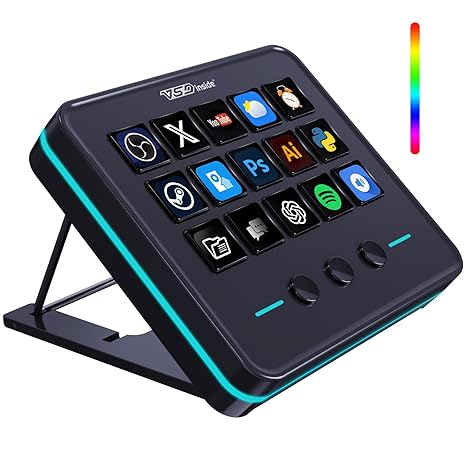
- VSDINSIDE Macro Keypad, Stream Controller Dec...
0 ratings

Item #:
219575296
VSDINSIDE Macro Keypad, Stream Controller Deck Gaming Streaming Shortcut Keyboard, 18 Programmable Keys Customizable Visual AI Pad USB Soundboard for
Item #:
219575296
WST 217
Price Details
Excluding Shipping & Custom charges ( Shipping and custom charges will be calculated on checkout )
*All items will import from US
0 ratings
Write a review
In stock
 Imported from USA store
QTY:
Order now and get it around Monday, July 06
Secured transaction
Ubuy works hard to protect your security and privacy. Our advanced payment security system ensures confidentiality by encrypting your information during transmission using AES (Advanced Encryption Standards) and SSL (Secure Socket Layer) protocols. Your payment details are 100% secure as we do not share your payment details with third party sellers.
Our Top Logistics Partners


Once you experience the VSDinside STREAMING DECK smart console, you’ll find live streaming is no longer possible without it.

Fast
Shipping

Free
Return*

Secure Packaging

100% Original Products

PCI DSS Compliance

ISO 27001 Certified


Note: Step Down Voltage Transformer required for using electronics products of US store (110-120). Recommended power converters Buy Now.


What Stands Out
Customizable Keys
With 18 programmable keys, users can personalize shortcuts for gaming or streaming, enhancing their efficiency and productivity in various applications like OBS and YouTube.
Versatile Compatibility
The keypad is designed to work seamlessly with Windows, Mac, and Linux systems, making it an ideal accessory for a diverse range of users, from streamers to office professionals.
Compact Design
Its sleek and portable design fits perfectly on any desk setup, ensuring easy access to commands without cluttering the workspace, ideal for both home and office environments.
Product Details
Product Description
VSDINSIDE Macro Keypad, Stream Controller Deck Gaming Streaming Shortcut Keyboard, 18 Programmable Keys Customizable Visual AI Pad USB Soundboard for OBS, YouTube, Desk Office Setup, Laptop, PC, Mac
Have any Query? Chat with us
Customer Questions & Answers
-
Question:
What is the VSDINSIDE Macro Keypad used for?
Answer: The VSDINSIDE Macro Keypad is designed for streamers, gamers, and content creators to streamline their workflow. With 18 programmable keys, users can customize shortcuts for various functions, enhancing productivity during live streaming and gaming sessions. This allows you to switch scenes, trigger sound effects, or execute complex commands at the touch of a button, enabling a smoother, more engaging viewer experience. -
Question:
Can the keys on the VSDINSIDE Macro Keypad be customized?
Answer: Yes, the keys on the VSDINSIDE Macro Keypad are highly customizable. Users can program each of the 18 keys to perform specific actions or functions, tailored to their needs. This customization is particularly useful for streamers and gamers who require quick access to various controls such as switching graphics, adjusting audio levels, or activating macros, enhancing their interactive experience while gaming or streaming. -
Question:
Is the VSDINSIDE Macro Keypad compatible with multiple operating systems?
Answer: Absolutely, the VSDINSIDE Macro Keypad is designed to be compatible with various operating systems, including Windows and Mac OS. This versatility allows users from different backgrounds to incorporate the keypad into their existing setups. Whether you’re using it for gaming, streaming, or creative tasks, having a keypad that works across platforms makes it an excellent addition to your toolkit. -
Question:
How does the Visual AI feature work in the VSDINSIDE Macro Keypad?
Answer: The Visual AI feature in the VSDINSIDE Macro Keypad provides a dynamic and interactive interface for users. It allows for visual customization where users can assign images and icons to keys, making it easier to identify functions during use. This feature is particularly beneficial during high-pressure situations like live streaming, where quick recognition of commands can significantly enhance workflow and performance. -
Question:
What are some practical uses for the VSDINSIDE Macro Keypad?
Answer: The VSDINSIDE Macro Keypad boasts a range of practical uses, making it a versatile tool. Streamers can use it to change scenes or trigger effects, gamers may employ it to execute complex combos quickly, while content creators can utilize it for shortcuts in video editing software. The versatility of the keypad makes it a valuable tool across various digital environments, boosting productivity and enhancing the user experience. -
Question:
Is the VSDINSIDE Macro Keypad portable?
Answer: Yes, the VSDINSIDE Macro Keypad is designed with portability in mind. Its compact size makes it easy to fit into a backpack or laptop bag, making it convenient for on-the-go use. This portability means you can take your macro keypad to gaming tournaments, streaming events, or collaborative projects, ensuring you have your customized setup available whenever you need it. -
Question:
What type of connectivity does the VSDINSIDE Macro Keypad use?
Answer: The VSDINSIDE Macro Keypad connects via USB, ensuring a reliable and fast connection to your computer or laptop. The USB connectivity allows for a plug-and-play setup, meaning you can start using it almost immediately without the need for any special software installations. This straightforward approach makes it accessible to both beginners and experienced users alike. -
Question:
Can I use the VSDINSIDE Macro Keypad with my gaming console?
Answer: The VSDINSIDE Macro Keypad is primarily designed for use with computers and may not be directly compatible with gaming consoles. However, if your console supports USB input and allows for keyboard accessory setups, it may work in limited scenarios. Users looking for console compatibility should verify their specific gaming console's ability to recognize external keyboards for macro functions. -
Question:
What is required to set up the VSDINSIDE Macro Keypad?
Answer: Setting up the VSDINSIDE Macro Keypad is straightforward. You simply connect the keypad to a USB port on your computer or laptop. Once connected, you can use software provided or compatible applications to configure the keys as per your requirements. This setup process allows for quick customization to match your gaming or streaming needs, enabling you to optimize your workflow efficiently. -
Question:
Where can I buy the VSDINSIDE Macro Keypad in Samoa?
Answer: You can buy the VSDINSIDE Macro Keypad at Ubuy, a reliable online shopping platform that offers a variety of electronics and gadgets. Ubuy provides a user-friendly interface and secure payment options, making it easy for customers in Samoa to purchase tech products like the Macro Keypad. Additionally, they often provide detailed product descriptions and reviews, helping you make informed decisions.
VSDINSIDE Gaming Keyboards Editorial Review
No editorial reviews found
Customer Reviews & Ratings
1 customers ratings
-
5 Star
100%
-
4 Star
0%
-
3 Star
0%
-
2 Star
0%
-
1 Star
0%
Review this product
Share your thoughts with other customers
Product Price History
Important information
- Limitations : For products shipped internationally, please note that any manufacturer warranty may not be valid; manufacturer service options may not be available; product manuals, instructions, and safety warnings may not be in destination country languages; the products (and accompanying materials) may not be designed in accordance with destination country standards, specifications, and labeling requirements; and the products may not conform to destination country voltage and other electrical standards (requiring use of an adapter or converter if appropriate). The recipient is responsible for assuring that the product can be lawfully imported to the destination country. When ordering from Ubuy or its affiliates, the recipient is the importer of record and must comply with all laws and regulations of the destination country.
- Not all the products listed on Ubuy are for sale, as Ubuy is a global search engine. Products are subject to export/trade regulations.
WST 217
Order now and get it around Monday, July 06
This item is not restrict in my country.(Please click on above link if this item is not restrict in your country, So our team will review and allow.)
QTY:
Secured transaction
Ubuy works hard to protect your security and privacy. Our advanced payment security system ensures confidentiality by encrypting your information during transmission using AES (Advanced Encryption Standards) and SSL (Secure Socket Layer) protocols. Your payment details are 100% secure as we do not share your payment details with third party sellers.
Our Top Logistics Partners
Fastest cross-border delivery
Features & Benefits
- Transform your streaming experience with the VSDinside Streaming Deck.
- Enjoy 10x faster streaming setup and seamless live management.
- Customize 18 macro keys for your specific workflow needs.
- One-click command for sound effects and media control enhances efficiency.
- RGB light ring creates an engaging desktop atmosphere.
- Perfect for gamers, streamers, and content creators striving for peak performance.